


The Ultimate Guide to Converting Business Logos into Embroidery Files
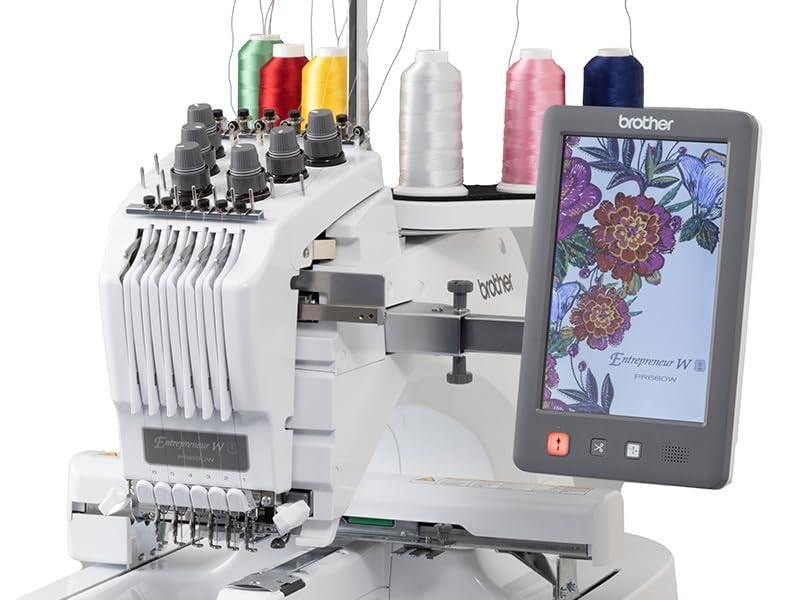
Your business logo represents countless hours of thought, design, and brand building. It appears on your website, your business cards, and your storefront. Now you want to see it on employee uniforms, promotional hats, or giveaway bags. Embroidery adds a level of professionalism and durability that printing cannot match. Stitched logos look substantial. They feel high-end. They tell customers you care about quality. But there is a catch: your beautiful logo exists as a digital file designed for screens and paper. Embroidery machines speak a completely different language. They need stitch data, not pixels. The gap between a flat logo and a dimensional embroidered version can feel intimidating, especially if you are new to the world of garment decoration. The good news is that with the right knowledge and partners, the process is straightforward. When you learn how to Convert Your Business Logo to Embroidery, you open up a world of branded merchandise possibilities that elevate your company's image.
Why Embroidery Matters for Your Brand
Before we dive into the technical details, let us talk about why embroidery deserves a place in your marketing strategy. Printed logos on t-shirts fade after a few washes. Screen printed designs crack and peel over time. Heat transfers can peel at the edges. Embroidery, done right, lasts as long as the garment itself.
Stitched logos convey quality. When a potential customer sees an embroidered logo on a uniform, they subregister that attention to detail. It signals that your company invests in its presentation. For industries like construction, hospitality, and automotive services, embroidered uniforms build trust before you ever speak a word.
Embroidery also works on items where printing fails. Hats, beanies, and structured caps need embroidery because printing on curved surfaces proves difficult. Jackets and heavy workwear benefit from the dimensional look of stitching. Expanding your branded merchandise into these categories requires embroidery-ready logo files.
The Fundamental Difference: Images vs. Stitch Files
Here is the core concept you need to understand: your logo file, whether JPG, PNG, PDF, or AI, is not what the embroidery machine reads. Those formats describe how colors appear on a screen or page. An embroidery machine needs coordinates. It needs to know exactly where to stick the needle, how long each stitch should be, and when to change thread colors.
Creating those instructions from your logo is called digitizing. Think of it as translation. A human digitizer or specialized software looks at your logo and decides how to build it with thread. Which parts become satin stitches that shine? Which areas need fill stitches for coverage? How should the needle flow through curves to keep edges crisp?
This translation process means your original logo will not look exactly the same in thread as it does on screen. Thread has thickness. Fabric has texture. Stitches reflect light differently than ink. Understanding this going in prevents disappointment later.
Step One: Gather Your Logo Files
The conversion process starts with gathering the best possible version of your logo. If you have multiple file formats, gather them all. The digitizer or software needs the cleanest source material to work with.
Vector files like AI, EPS, PDF, or SVG are ideal. These formats use mathematical paths rather than pixels. They scale infinitely without losing quality, and they give the digitizer clear shapes to trace . If you have vector files, you are starting from the best possible place.
If you only have raster files like JPG or PNG, look for the highest resolution version. At least 300 DPI at the size you want to embroider works well. Low resolution images from websites cause problems because the edges blur when enlarged .
Also gather any brand guidelines you have. Specific color matches matter. If your logo uses Pantone colors, note them. Thread brands have their own color systems, but knowing your target colors helps the digitizer choose matches.
Step Two: Understand Size Requirements
Logo size for embroidery differs from logo size for print. That beautiful business card with tiny text and intricate details will not translate to thread at the same dimensions.
Embroidery has physical limits. The smallest practical size for most embroidered logos is about two to three inches wide for left chest placements . Within that space, text should be at least a quarter inch tall to remain legible . Fine details thinner than about two millimeters may disappear or stitch poorly .
Consider where the logo will appear. Left chest logos on polo shirts typically run two to four inches wide. Hat logos often fit in an area about two inches tall by four inches wide . Jacket backs can go much larger, up to twelve inches or more .
If your logo contains small text or intricate details, discuss with your digitizer whether those elements can be simplified or enlarged. Sometimes slight modifications make the difference between a mediocre stitch-out and a stunning one.
Step Three: Choose Your Embroidery File Format
Different embroidery machines read different file formats. Your choice depends on who will do the actual stitching.
If you own your own embroidery machine, you already know its preferred format. Brother and Baby Lock use PES. Tajima uses DST. Melco uses EXP. Husqvarna Viking uses HUS. Bernina uses ART .
If you send logos to a production partner, ask what format they prefer. Most commercial shops accept DST because it is the universal standard . Some may also accept PES or other formats. Always confirm before delivering files.
If you are building a library of embroidery files for future use, consider saving in multiple formats. Many digitizers provide DST plus your machine's native format. This future-proofs your designs in case you change equipment later.
Step Four: Work With a Professional Digitizer
For business logos, professional digitizing is worth the investment. While free software exists and hobbyists digitize their own designs, your company logo deserves expert attention.
Professional digitizers understand the nuances of thread and fabric. They know how to set underlay to prevent shifting. They adjust pull compensation so circles stay round and letters stay straight. They choose stitch directions that catch light beautifully. They optimize stitch counts to balance quality with production time .
The cost for professional digitizing typically ranges from fifteen to forty dollars per design, depending on complexity and size . Considering the value of your brand and the cost of garments, that investment makes sense. A poorly digitized logo wastes time, thread, and materials. It also reflects poorly on your brand when uniforms look cheap.
When you hire a digitizer, provide clear instructions. Specify the intended garment type, since fabric affects digitizing settings. Tell them the exact size needed. Share your color requirements. The more information you provide, the better the result.
Step Five: Understand the Digitizing Process
Knowing what happens during digitizing helps you communicate with your provider and appreciate the work involved.
The digitizer starts by importing your logo into specialized software. They trace each element, creating vector paths that will become stitches. For complex logos, this manual tracing requires skill and patience .
Next, they assign stitch types to each area. Satin stitches work for borders and text. Tatami fills cover large areas. Running stitches handle fine details. Each stitch type has specific parameters for density, angle, and underlay .
Underlay stitches go down first, creating a stable foundation. Edge run underlay defines borders. Zigzag underlay stabilizes fill areas. These hidden stitches prevent shifting and keep edges crisp .
Pull compensation adjusts shapes slightly wider to counteract how stitches pull fabric. Without it, designs distort. Circles become ovals. Letters lean .
Finally, the digitizer sets color change points and sequences the design for efficient stitching. They simulate the stitch-out digitally, checking for issues before exporting the final file .
Step Six: Review and Approve
Most professional digitizers provide a digital proof or stitch simulation before final delivery. This shows you how the embroidered logo will look. Review it carefully.
Check that all logo elements are present and recognizable. Verify colors match your brand guidelines. Look at text legibility. If something looks wrong, speak up. Adjustments are easier before stitching starts.
Some digitizers also offer physical stitch samples for an additional fee. If you are producing a large order of uniforms, paying for a sample run on actual fabric saves money in the long run. You see exactly what the final product will look like and can approve with confidence.
Step Seven: Test on Actual Garments
Even with professional digitizing and digital proofs, testing on your actual garments matters. Different fabrics behave differently. A design that stitches perfectly on smooth polo knit may behave differently on textured fleece or structured hat material.
If you are producing a large run, stitch one sample garment first. Examine it closely under good light. Check edges, coverage, and color accuracy. Make sure the logo sits straight and the fabric lies flat without puckering.
If issues appear, return to your digitizer with photos and notes. Reputable professionals stand behind their work and will adjust files as needed. Catching problems on one sample costs far less than fixing dozens of finished garments.
Step Eight: Build Your Embroidery File Library
Once you have approved embroidery files, store them carefully. Create a folder structure that makes sense for your business. Include the date, the garment type, the size, and the format.
For example: Logo_LeftChest_4in_DST_2025. Name files clearly so anyone in your organization can find what they need. Keep backups in multiple locations.
If you have files for different garment types or sizes, label them distinctly. A design digitized for a left chest polo will not work for a jacket back without adjustment. Having separate files saves time and prevents mistakes.
Common Questions About Logo Conversion
How long does digitizing take? Professional digitizers typically turn designs around in 24 to 48 hours. Rush services cost extra but can deliver same day.
Can any logo be embroidered? Most logos can be embroidered with some adaptation. Extremely intricate designs with tiny text or fine details may need simplification. Discuss options with your digitizer.
Will the colors match exactly? Thread colors approximate printed colors but rarely match perfectly. Professional digitizers use thread color charts to get as close as possible. Accepting slight variation prevents disappointment.
What about very small logos? Logos under two inches wide challenge embroidery. Details disappear. Text becomes unreadable. Consider using woven labels for tiny applications instead.
When to Digitize Yourself
Some business owners enjoy learning new skills and digitize their own logos. If you own an embroidery machine and plan to produce significant volume, learning digitizing makes sense.
Start with simple designs. Practice on scrap fabric. Study tutorials and join embroidery communities. Expect a learning curve measured in months, not days. Professional-level digitizing takes time to develop .
Free tools like Ink/Stitch offer entry points without financial commitment. As skills grow, consider investing in professional software like Hatch or Wilcom. These tools provide control that free options lack .
Balance your time against your business needs. If digitizing steals hours from serving customers or growing your business, outsourcing makes financial sense.
Conclusion
Converting your business logo to embroidery opens doors to branded merchandise that elevates your company's image. Uniforms, hats, and promotional items with stitched logos convey quality and professionalism that printed items cannot match.
The process requires understanding the difference between images and stitch files. It demands clean source art, appropriate sizing, and the right file formats. Professional digitizing ensures your logo translates beautifully to thread, with proper underlay, density, and pull compensation.
Whether you partner with an experienced digitizer or learn the craft yourself, the goal remains the same: logos that stitch cleanly, last for years, and represent your brand with pride. Take the time to do it right, and your embroidered logo will work as hard as you do.
Kategorien
Mehr lesen
Создатели проекта Neverness to Everness поделились планами по обновлению, основанными на мнениях участников закрытого теста. Геймплейные механики, включая управление транспортом, будут доработаны для повышения удобства. Особое внимание уделяется контенту открытого мира: все дополнительные активности будут пересмотрены, чтобы сделать их более увлекательными и снизить время ожидания. Социальные...
Never let pain create social stress in your life, especially with the heightened pace of the present world. If you have been suffering from pain ranging moderately to severely due to injuries or clinical procedures, the main missing link seems to be the search for trusted pain-relieving means. Enter the option of Buy Percocet Online. This guide will give you a heads-up, weighing safety against...
在現代數位娛樂時代,GameQueen 已成為遊戲愛好者的首選平台,提供多元化的遊戲體驗與專業資訊。無論你是新手玩家還是資深遊戲玩家,GameQueen 都能滿足你對遊戲的熱情,從最新遊戲推薦到專業攻略,讓每一次遊戲之旅都充滿驚喜。 全方位遊戲資源整合 GameQueen 不僅提供最新的遊戲資訊,還整合了多種遊戲資源,從策略指南、角色分析到遊戲新聞更新,應有盡有。玩家可以在這裡找到最詳細的遊戲數據,了解每個角色、技能及裝備的特性,幫助玩家制定最佳遊戲策略,提升遊戲技巧。 精選遊戲推薦 無論是動作冒險、角色扮演,還是休閒益智遊戲,GameQueen 都提供精準的推薦,讓玩家根據自己的興趣挑選最適合的遊戲。平台的推薦系統根據玩家的喜好與遊戲風格,智能篩選出高質量遊戲,保證每一次下載與遊玩都值得期待。 專業遊戲攻略 對於追求深度體驗的玩家來說,攻略是不可或缺的工具。GameQueen...

In today’s fast-moving commercial landscape, the ability to move oversized, overweight, and complex loads safely and efficiently is not a luxury—it’s a necessity. Across the United Kingdom, heavy haulage services play a critical role in keeping industries operational, infrastructure projects on schedule, and supply chains resilient. From construction and manufacturing to...
Netflix and Pearl Studio have secured a legendary director for their upcoming animated musical, Over the Moon. The project will be helmed by Glen Keane, the Oscar-nominated animator famed for bringing Disney icons like Ariel, the Beast, and Aladdin to life. This enchanting adventure follows a determined girl who builds a rocket to journey to the moon and meet a mythical goddess. Slated for a...